
Inland Revenue Authority
This article explains how 2Shakes captures IR authority. It explains correct signing for multiple entities and what role or position you need to use. It highlights recent improvements to 2Shakes to help you avoid common mistakes. We will walk through an example and finish with answers to frequently asked questions.
In 2025 Inland Revenue updated their technical guidance on Authority to Act for Tax Agents, Representatives and Nominated Persons: Access to a Client’s Inland Revenue Information (OS25/03). OS25/03 explains that Registered Bookkeepers and Tax Agents, must hold the correct IR Authority before linking to a client’s IR account. IR Community Compliance officer’s may ask at any time to review these to confirm that authorities are correctly completed.
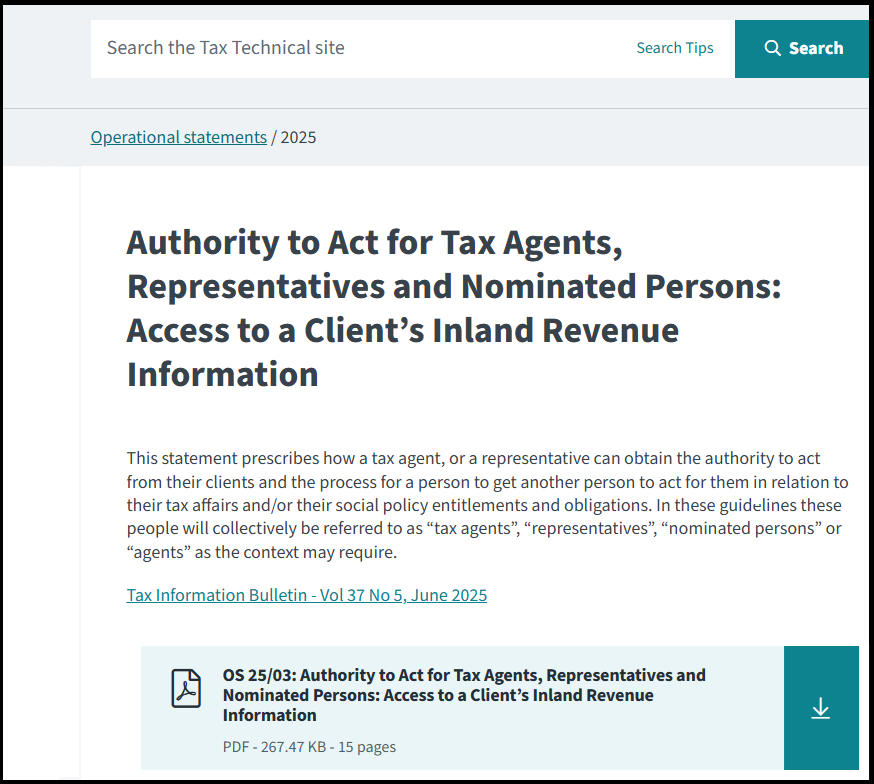
IR Technical guidance can be found in Operation Standard OS25/03.
2Shakes Signing Rules
To understand how IR authorities work in 2Shakes, you first up need to understand how documents are signed. Let’s cover the main rules for when people sign in 2Shakes. If you have multiple entities (i.e. more than one client) on an Agreement:
The Main Signatory signs for themselves and all organisations
Other Individual clients sign for themselves.
If you set an Individual client to Not Signing, the Main Signatory will sign for them too. (See FAQ below for more on situations where a guardian signs for a child, someone has power of attorneys or there is a deceased estate). .
When there is just a single client (i.e. a single entity) on an Agreement:
You can have multiple signatories (either added Beneficial Owners, or people added on the last page as added signatories).
In this case, everyone signs for the same single entity.
How 2Shakes Signs IR Authority
For a single entity Agreement, it’s pretty simple. You can have one signatory or add as many signatories as required on this agreement. Everyone who signs, is granting authority on behalf of that single entity.
The complexity comes on multiple-entity Agreements, and that’s what we will focus on below. Let’s walk through an example involving a group of related taxpayers.
Meet Bruce and Claire Hold

Bruce and Claire Hold are the (fictitious) couple in our example.
Bruce and Claire Hold run a (fictitious) business together and a family trust. They engage My CFO Services Limited (again, fictitious) to help with all their tax needs - for the company, the trust and each of their personal tax accounts. That means four IR numbers must be authorised, and the four clients make up a multi-entity agreement.
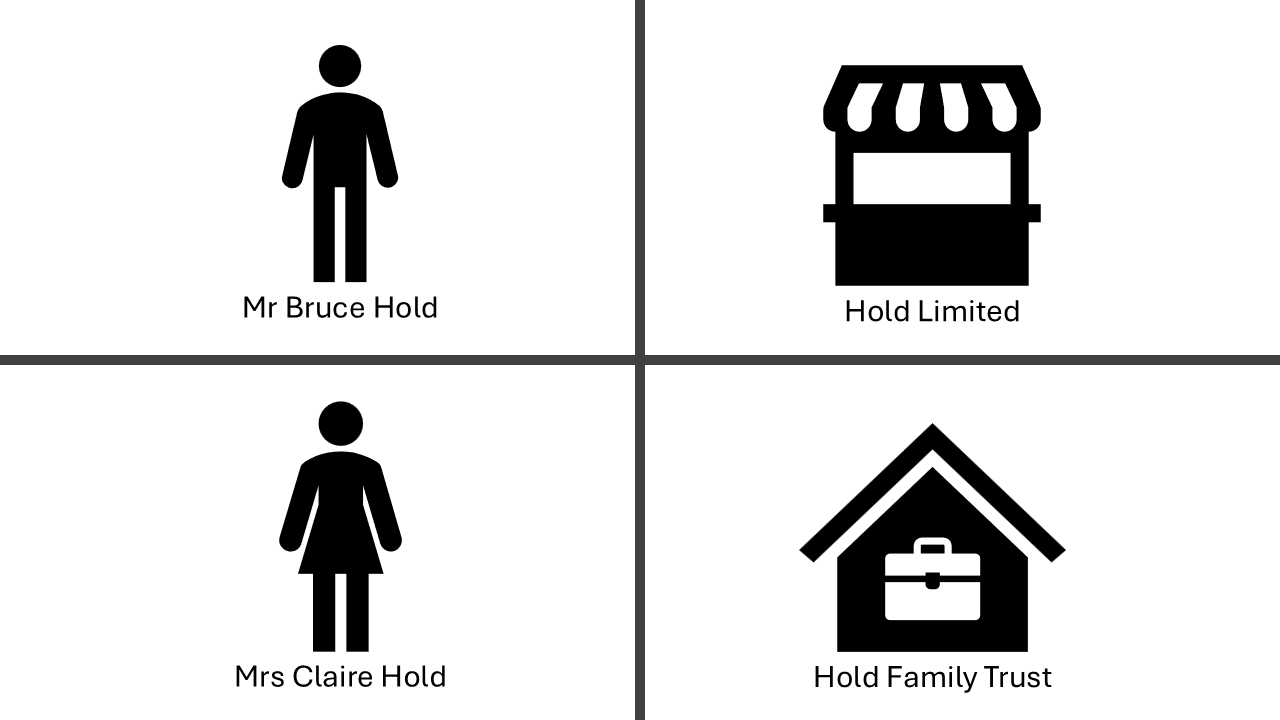
In total the Holds have four IR numbers, using 2Shakes you can get IR authority for all four in one agreement!
Bruce organises the engagement. As both a director of the company and a trustee. IR relies on these roles when checking authority. He shares the trust deed and trust minutes which show he (alone) can sign for the trust .
Important: IR requires all Trustees to sign an IR Authority, unless (as in this case) the trust have minuted or allowed in the deed for one trustee to act for the trust. See the FAQ for more information.
An Agreement for the Holds
When you look up a company like Hold Limited using the 2Shakes NZBN search wizard, it automatically imports company details and directors. It shows you that Claire and Bruce are directors, letting you select Bruce as the main signatory. Selecting a director as the main signatory also automatically pulls their Director role into the “All Roles” field.
Since Bruce and Claire will also be Individual clients, you would select them both during the wizard to pull them through.
Bruce will be set to Director, as mentioned above. However, when adding the Hold Family Trust as an ‘added organisation’, 2Shakes cannot automatically populate a role, so you must add the Trustee role manually.
You must include all roles held by the main signatory’s. In this example, that means:
Director (for the company and automatically populated)
Trustee (for the trust you added, which you manually type in after the Director role)
What about Claire?
On the first page, we only need to set the Roles for the Main Signatory.
Other Individuals get set in the background to an Individual client, as Claire would be here. (You will be able see/change all signers roles when you arrive at the Parties & Signatories screen.)
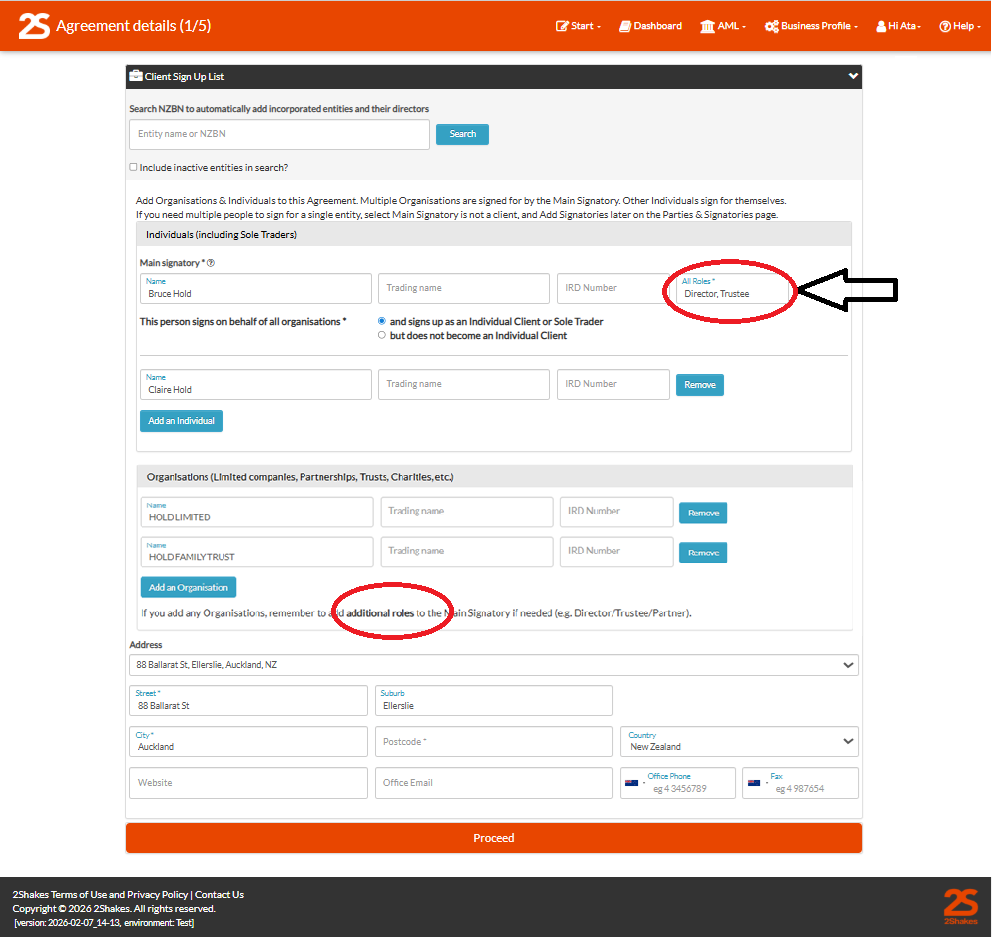
IMPORTANT – Remember to check ALL Roles are entered. Above you can see that Bruce Holds Director role auto populated, but we added Trustee in as well manually. There is some help text on additional roles to remind you to do this when you Add an Organisation.
For trust or partnership clients it is especially important to double‑check the roles to ensure you add the correct position (e.g., Trustee, Partner).
How IR Authority is Set
After the services and fees screen you get to the Authorities screen. The IR Authority on this screen defaults from your profile. Our Authorities support page explains how to set this up. After the AML screen you get to the parties and signatories’ screen.
ID Verification Requirements
For Agreements that include IR Authority you must verify the identity of each person signing. 2Shakes defaults to a Biometric IDV option (an AML level of verification) that Inland Revenue accepts under OS25/03. If you choose Electronic or Manual ID instead, there are additional considerations covered in the FAQs.
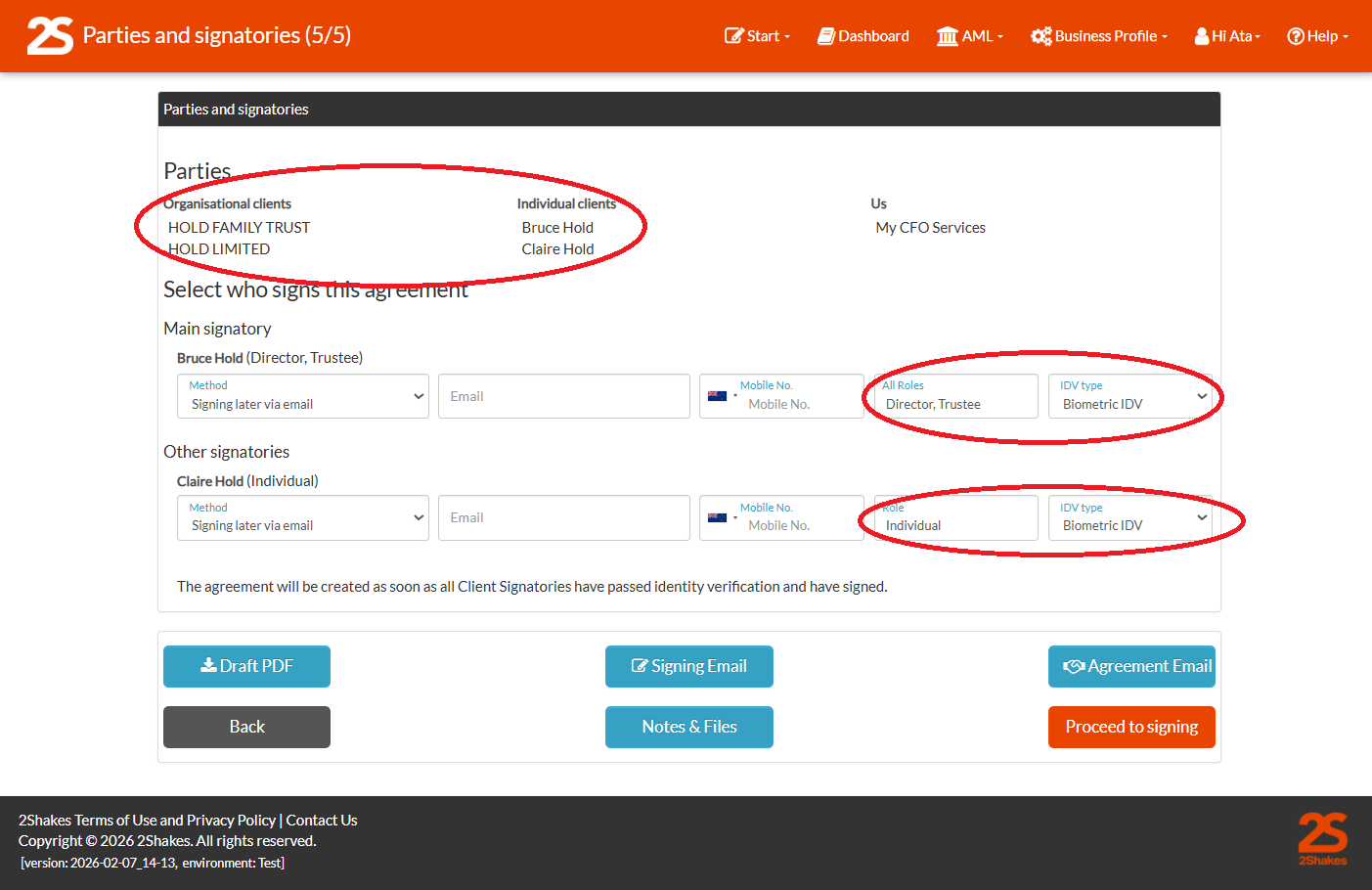
During this step, you can again review and correct the ‘All Roles’ field for any of the signatories.
Each individual (such as Claire above) will separately verify their identity for their own personal IR account. Claire has ‘Individual’ added by 2Shakes automatically to show she is signing for herself. See the FAQ for more on roles and use of the Individual position.
What Bruce and Claire See During Signing
Each signatory receives their own unique signing email. Here is what Bruce Hold sees:
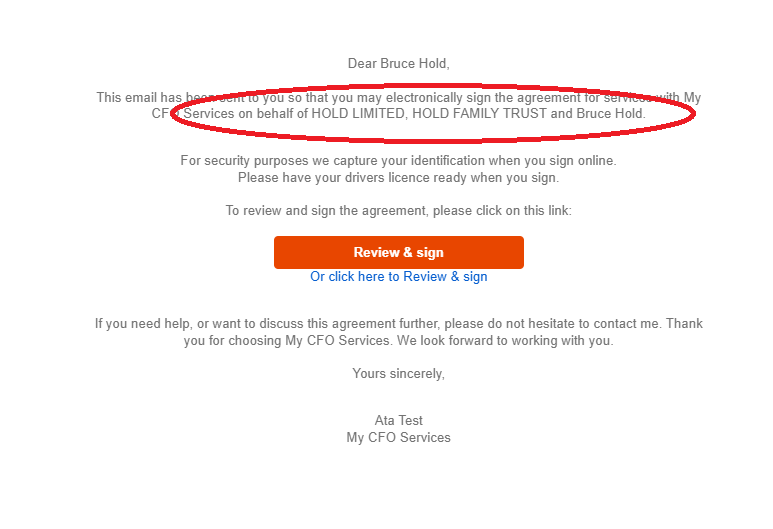
Bruce sees the three entities he is signing for: the company, the trust and himself.
Meanwhile, Claire sees only herself:
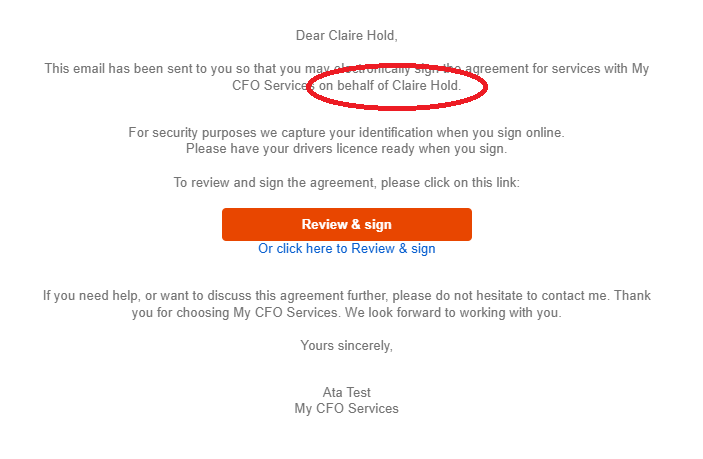
Claire’s as an individual does not see the company, the trust or Bruce!
When Bruce clicks on the link in the email he comes to the online signing screen. Bruce must confirm the IR numbers he is authorising.
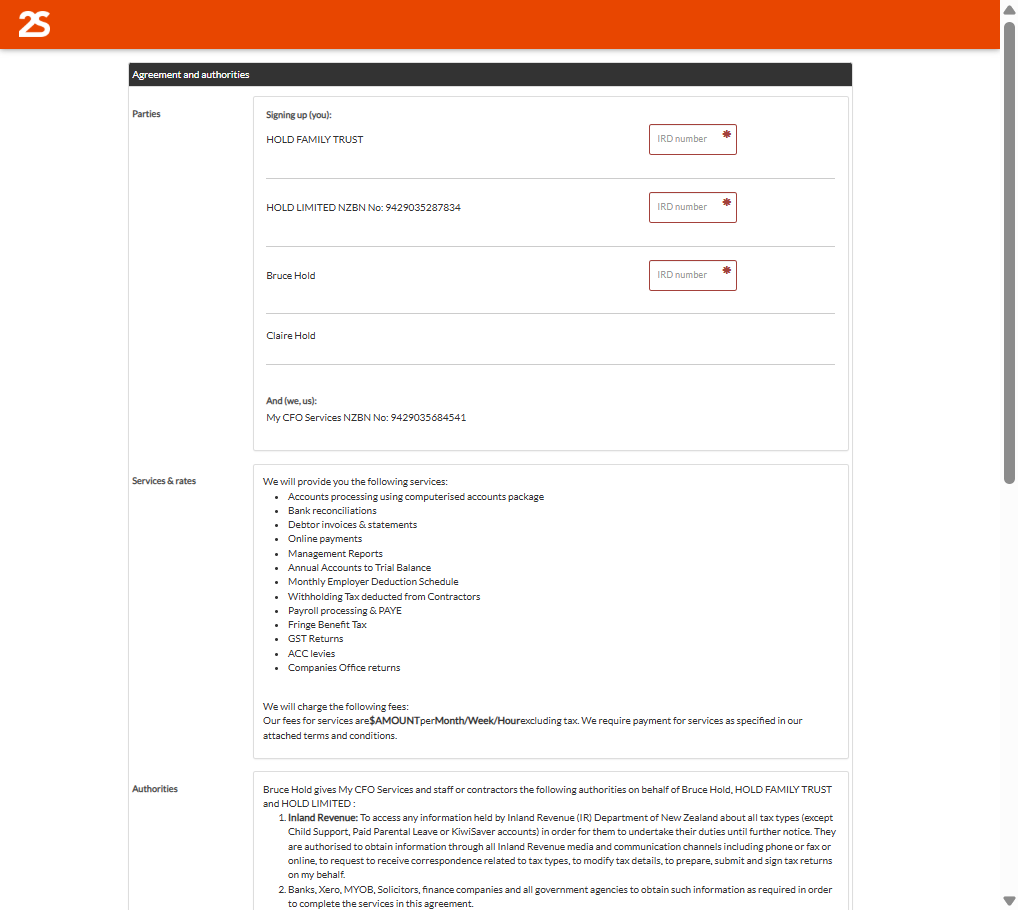
Bruce as the main signer sees only the three IR numbers for the company, the trust and himself.
Meanwhile, when Claire clicks on her link she can NOT see IR numbers for the company, the trust or Bruce Hold.
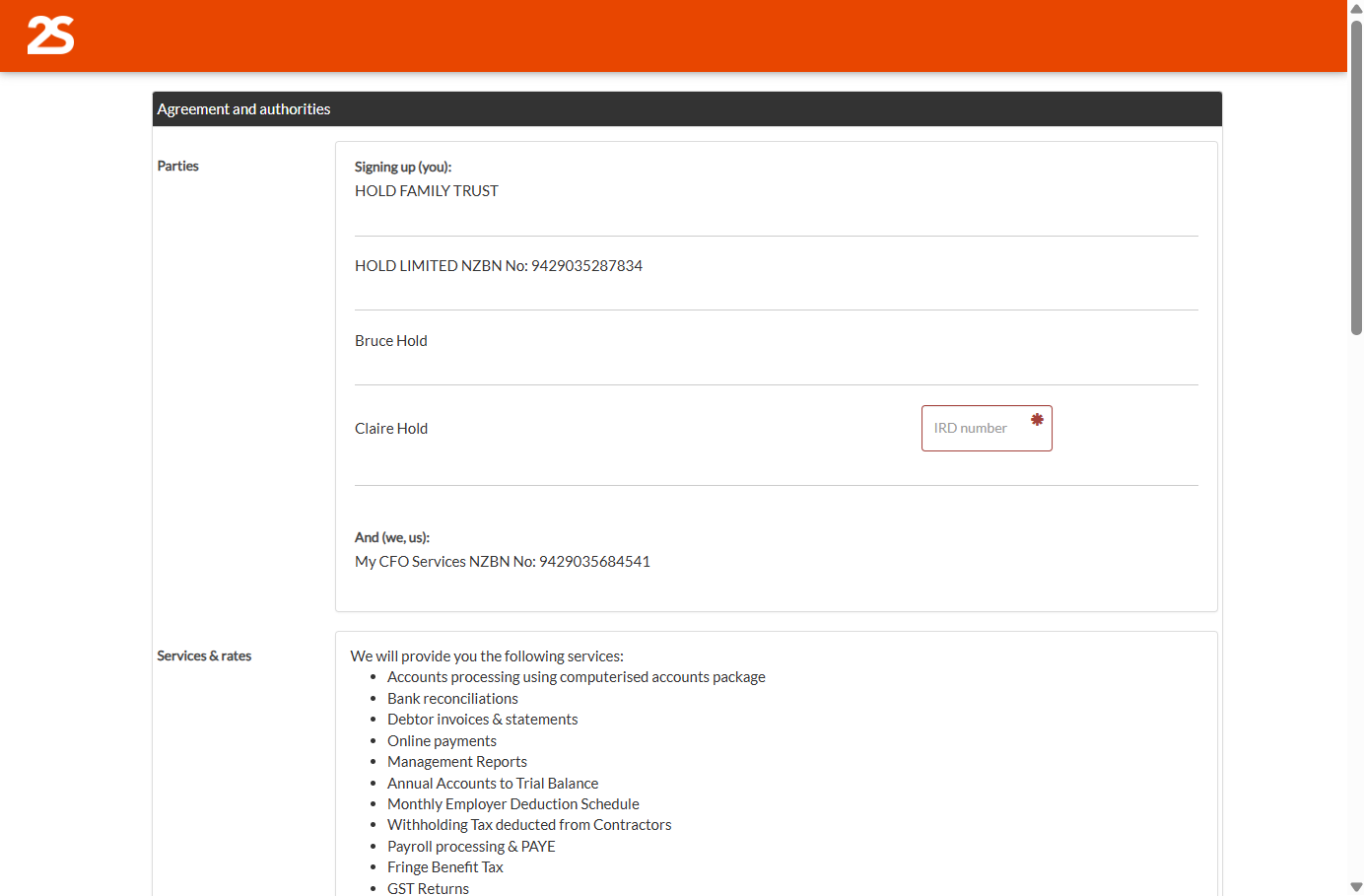
Claire only sees her own IR number.
Bruce reviews the Authorities he is giving, including the IR Authority. Before signing Bruce must tick the box to give authority on behalf of the company, the trust and himself.
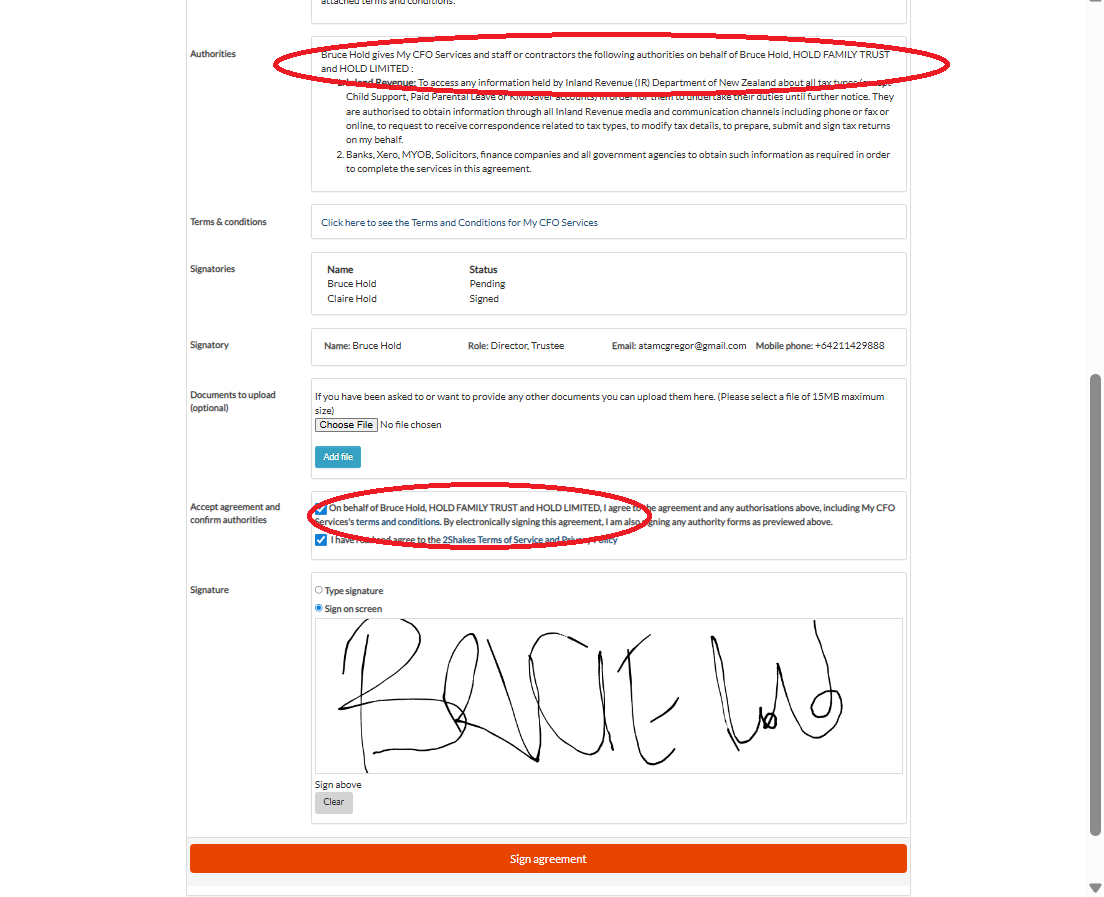
Bruce electronically signs for the company, the trust and himself.
Claire sees only herself in the Authorities:
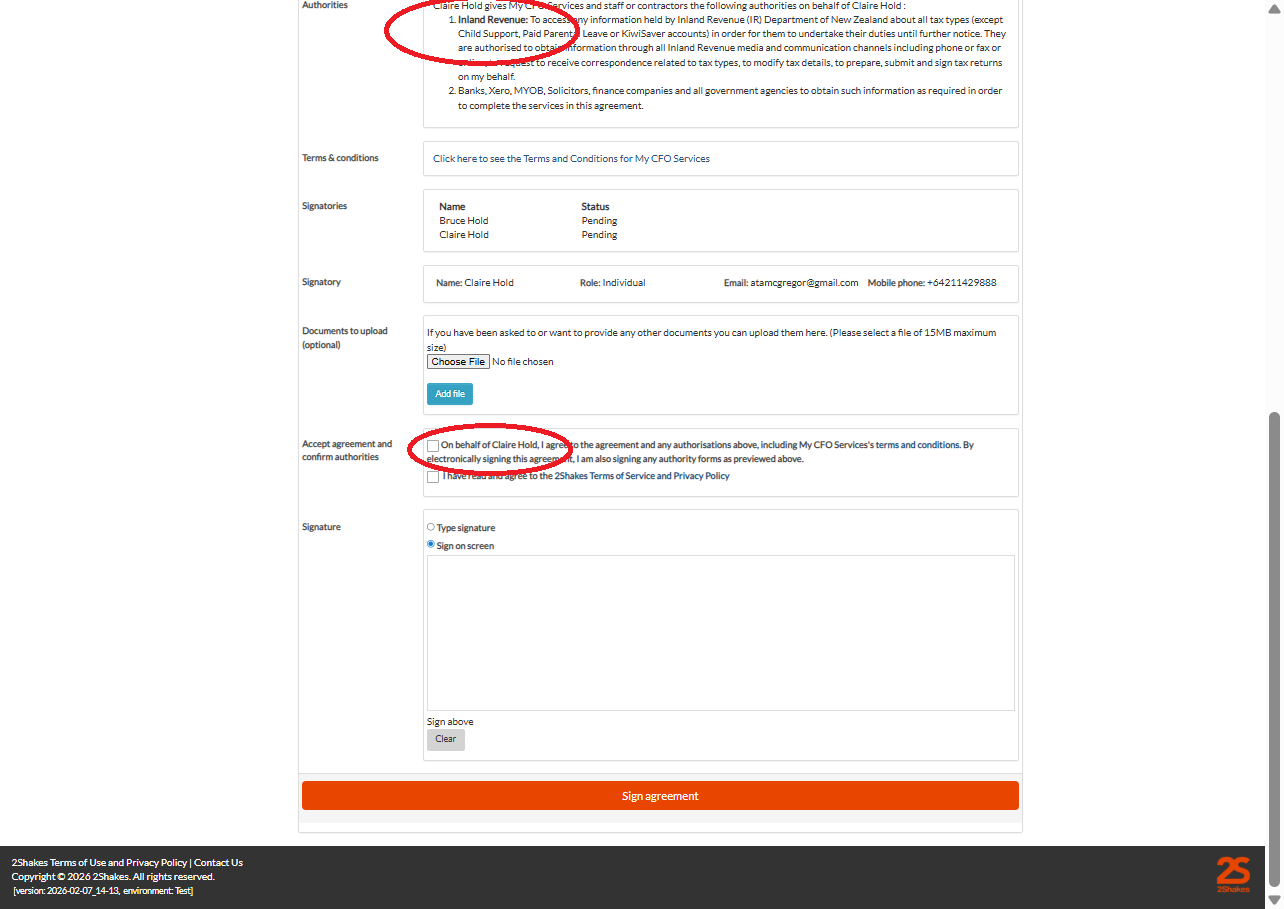
Claire sees and signs only for herself.
What the Agreement Shows
After signing and completing ID verification, the Agreement is automatically emailed to both Claire and Bruce.
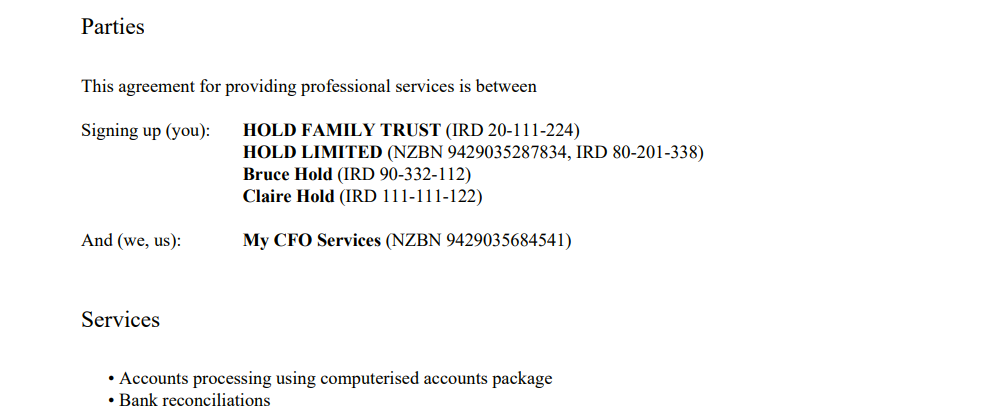
At the top of the Agreement PDF the four entities on the agreement show with IR numbers.
In the Signatories section (below), under each signature you can see:
Which entities each person signed for
Their name and Role(s),
The date they signed, along with a 2Shakes reference number,
A reference number linking to the ID verification.
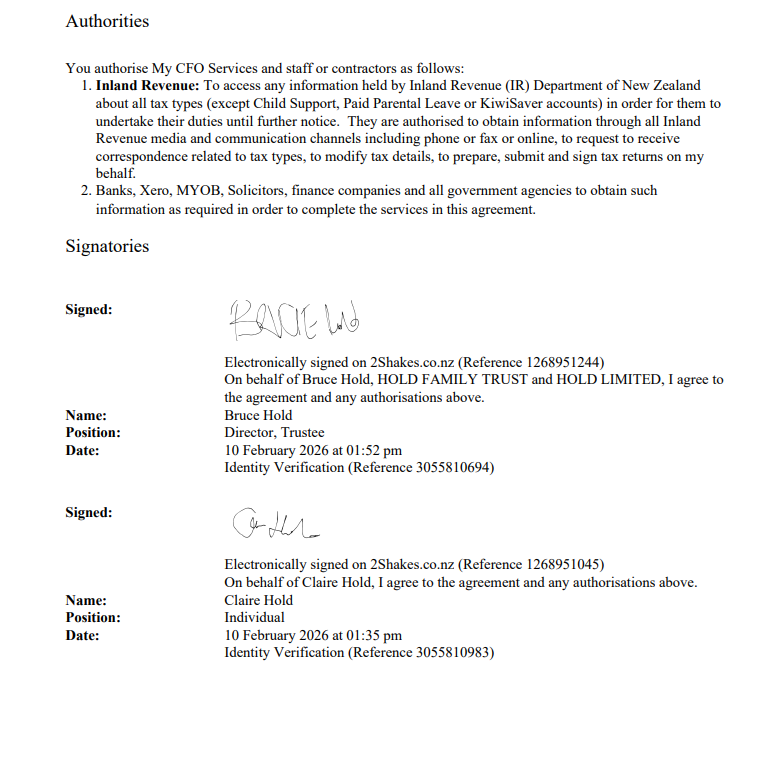
The signature block at the bottom of agreement show an ‘on behalf of’ statement.
Recent updates to improve the the Agreement PDF
2Shakes has updated the Agreement PDF to make it clearer who signed for what. Previously, in a single-entity Agreement, the Position/Role for each signatory was shown.
In a multi-entity Agreement, only the Position(s)/Role(s) of the Main Signatory was shown, since all other Individuals were signing for themselves.
To improve clarity the Position(s)/Role(s) of all signatories is shown. We now include an “on behalf of statement”, that clearly shows what each person has signed for. This is the same statement that people have always seen when signing.
Roles for Trusts and Partnerships
2Shakes automatically populates the Role of Director for limited companies pulled from NZBN.
2Shakes cannot automatically populate the roles when the main signatory signs other entities such as trusts or partnerships. Often these entity types are not registered with NZBN, but even when they are the NZBN doesn’t return the roles for Trusts or Partnership.
The same situation occurs when the Main Signatory is an Executor of a Deceased Estate, or signs as Power of Attorney on behalf of someone. See FAQ for more information.
We recommend you review your agreements for Trusts and Partnerships to ensure you have the main signatory’s position or positions correctly entered. If not, you can update the Role(s) when you next Renew the client agreement, so you will have all roles listed on the Agreement.
NB: On a Renewal, there is a pen (edit) icon on the Parties & Signatories page against each person on the Agreement. Use this to edit Roles on a renewal.
We hope the example above was helpful. The requirements around IR Authority vary, based on the type of organisations and situations involved. The following section explores some other scenarios and provides advice on how to manage them.
Frequently Asked Questions
-
Inland Revenue now manages most of their compliance reviews through its online system. They will notify you and you may be asked to upload proof of specific IR authorities for review. Inland Revenue’s system randomly selects IR numbers. So number of tax accounts you will be asked for will vary. You will then have a timeframe to get your paperwork uploaded to them.
Using the 2Shakes dashboard, you can quickly locate and download the necessary paperwork.
IR will have the date you linked to the tax account, and may wish to see older authorities along with current ones. In 2Shakes renewed agreements show with three dots and you can easily see the history on the dashboard.
For trusts, partnerships, or other non-company authorities, double-check you recorded the role(s) correctly (e.g. Partner, Trustee) when uploading to IR for review.
-
Not usually. Under Part 10 of the NZ Companies Act 1993, a company obligation can be entered by a person acting under the company’s express or implied authority – typically one director, CEO or CFO, but it could be anyone authorised by the company.
However, sometimes a company’s constitution requires all or multiple directors to sign. In this case you create a 2Shakes agreement with only one client (one entity) - the company. The main signatory is set to not sign as an individual. Then you will add in all the directors to sign on the Parties and Signatories page. All signatories entered will be emailed to sign.
-
Yes but not always. IR require all Trustees to sign an IR Authority for a trust UNLESS there is a formal agreement made that this is not needed. Often trusts will specify that one trustee can act for the trust. This might be recorded in the trust deed or minuted. If this is the case, then that one trustee can be the main signer. (Which is what happened in the example in this article).
IR may ask to see evidence of the trust deed or minutes. In which case you would need to get this from your client. You can store copies of these documents in 2Shakes Notes and Files for secure storage and easy reference.
If all trustees need to sign, then create a single entity agreement and add the additional trustees.
-
Yes. If someone cannot sign (for example a minor, incapacitated person, or deceased estate), the person with legal authority (parent, guardian, executor) becomes the main signatory who signs on their behalf. In 2Shakes, you:
Add the authorised representative as the main signatory, with appropriate Role(s)
Add the person they represent as an Individual Client (or as an Organisation in the case of a Deceased Estate)
On the Parties and Signatories screen, change the client to Not Signing This Agreement. This means the Main Signatory will sign on their behalf.
Identity Verification FAQ
-
You need to do Identity Verification of the person or people giving you Authority to Act at Government, including IR. It is a requirement of the OS25/03.
-
Biometric identity verification in 2Shakes is our top verification, and meets all the requirements you may need, including Government Authority and AML. Because it can meet all requirements, it is our default option. And you don’t have to be an AML reporting entity to access Biometric identity verification in 2Shakes.
If AML doesn’t apply and if you don’t want to use the Biometric ID Verification, IR does provide you with alternatives in OS25/03:
You can get certified copies of IDV documents, (these can be saved in 2Shakes)
You can select to do electronic IDV in 2Shakes (this has 5 data points that match).
You can capture photo ID (Passport, Driver License, OSPP, NZ certificate of identity, NZ firearms license, 18+card) or else do a Bank Match. For document copies, you can select Manual IDV if you use document copies and save these in Notes & Files.
-
In 2Shakes you can verify Australian ID documents (contact support@2Shakes.co.nz to set this up). If your client doesn’t have a NZ or Australian ID, we can’t do a Biometric or Electronic IDV for them. In that case you can verify their ID using the certified copy or photo ID options above.
Re-doing IR Authority FAQ
-
Not normally. In 2Shakes the default settings for IR Authority are that they remain in place until revoked. This means you only need to get an IR Authority done once for a client and it will endure as long as your agreement is in place. If you have done something different and specified a validity period, then when that expires, you will need to redo it. The authority is included in Renewals, to capture updates in IR’s wording.
-
No. IR consider that the IR authority can remain in place even if the authorising person has left the company. You can continue to act for the client if they wish to retain your services.
-
Yes. If the IR Authority was between the client and another Tax Agent or Registered Bookkeeper, then you will need to renew it. You can create a new agreement between yourself and the client and this will ensure that they are engaged with your practice, use your terms and conditions, and you hold IR Authority.
-
No. If the company formally changes its name at Companies Office, but it still has the same NZBN number and same IR number your IR Authority is with the same legal entity and remains valid. If you wish, you can use the Notes and Files section of 2Shakes to record the name change for your records.
-
Yes. If a sole trader in business set up a limited company using the same trading name they are effectively a new entity. They will have a new NZBN number and new IRD number will be created for the company, which is a different legal entity. In 2Shakes you will need to create a new agreement which would include IR authority for the new IRD number created for the company/new legal entity.
-
No. IR considers that the IR authority can remain in place even if the authorising person has left the company. In this case the director has not left, simply changed their name. So, you can continue to act for the client with IR.
-
Yes to be fully compliant with OS25/03. IR may ask that you update the position to show how the signer has authority. This is a requirement of the technical guidance. So if you did not type in the partner role into the All Roles field then it will not be included in the signing block on the agreement.
It is important to stress that the signers would have known who they were signing for. Both because they would have been asked to enter the relevant IR numbers and will have been told when signing.
But to be fully compliant with OS25/03 the position of ‘partner’ is required. An IR community compliance review may ask you redo this authority. You can proactively correct this using a Renewal in 2Shakes and ensuring that you enter All Roles.
Positions & Roles FAQ
-
No, but you can if it is useful. IR technical guidance does not require individuals to include a position. IR25/03 only refers to position as required when someone signs for an organisation. The position shows authority for an organisation.
2Shakes adds in the position of Individual for improved clarity, when the signatory is only signing for themselves. While this is not required, we feel it helps to make it very clear when someone is only signing for themselves as an individual.
You can change an individuals position yourself on the parties and signatory page. We don’t add the position Individual to the main signatory, because they are not only signing for themselves.
In addition, for every signatory we now list the different entities each is signing on behalf of, including their own name if signing for themselves as an Individual.
-
Inland Revenue’s OS 25/03 advises an authority to act can be signed by a person or persons with the requisite authority to bind that person/entity:
Companies: A person or persons who hold(s) the authority to bind the company to an agreement must provide the authority to act. This would normally be a director or a manager (CEO, CFO), or a person with delegated authority. Normally 1 director can sign but you should confirm this with your client. The company constitution can require more than one, or all directors to sign.
Trusts: The authority to act must be signed by all trustees, or by the trustee or trustees who have been authorised by the other trustees to act on all of their behalf. Sometimes 1 trustee can sign if the trust has documented this. Ask your client. IR may require evidence of this if they review the trust IR Authority.
Ordinary partnerships: The authority to act must be signed by a partner or by a person who has the delegated authority to bind the partnership.
Limited partnerships: The authority to act must be signed by a general partner or a person who has the delegated authority to bind the limited partnership.
All other entities: A person or persons with the requisite authority must sign the authority to act. Eg President, Chairperson, Secretary or Executive office holder of a club/society
We hope you found this article useful. If you have any questions, please contact support@2Shakes.co.nz and we will help.